Image Map
Showing posts with label TPT. Show all posts

Monday, August 1, 2016

Helping parents get ready for Kindergarten

https://www.teacherspayteachers.com/Product/Welcome-to-Kindergarten-Editable-Parent-Packet-BUNDLE-English-Spanish-and-TK-2012770

Sending your little one off to kindergarten can be emotional. Parents want to make sure their child's teacher will protect, love, and care for their child the way that they do. Our new students are someone's little one all grown up and off starting to have personal rather than familial experiences. 

Parents will eagerly await for their child to stories about school, their new friends, and the new things that they learned. And...our students will often answer, "Nothing" or "I don't know" leaving parents asking, "What DO they do all day."

Preparing parents and new kindergartners for school is equally important.  Teachers know how special each member of their new class will be and it's our job to help all children learn in a safe, exciting, educational environment.
https://www.teacherspayteachers.com/Product/Welcome-to-Kindergarten-Editable-Parent-Packet-BUNDLE-English-Spanish-and-TK-2012770

Each year, our district hosts a Bloom Into Kindergarten event for incoming kindergarten parents in May. We meet our new class members and discuss with the parents the expectations for incoming kindergartners keeping in mind developmentally appropriate goals and tasks. Parents and students make letter activities and we discuss the expectations and discuss all the wonders that kindergarten holds. 


We developed a Welcome to Kindergarten packet to hand out to parents during Bloom into Kindergarten, which we go through with them.

Included on the front page is all of our contact information and the first day of school information.  
The following pages discuss:
-Academic expectations and goals
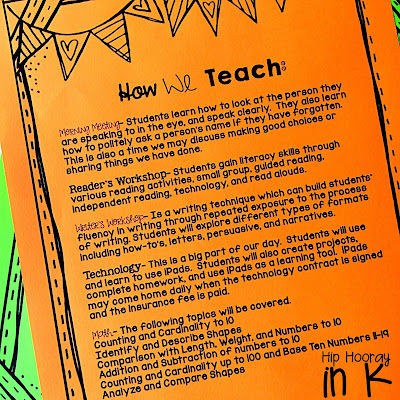
-They way that we teach
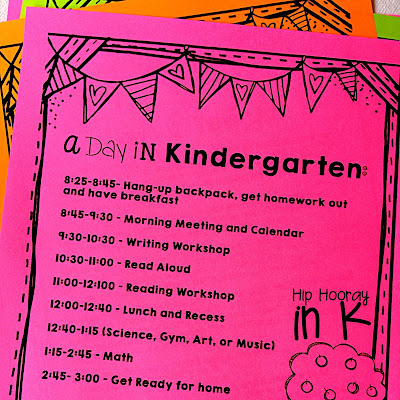
-What a day in kindergarten looks like
-All first day of school information
-The kindergarten supply list 
-Apps that we use in school (we are 1:1 iPads)
-Resource pages including proper letter formation, our sight word list, a writing practice page, 2D and 3D shapes, and number flash cards. 
https://www.teacherspayteachers.com/Product/Welcome-to-Kindergarten-Editable-Parent-Packet-BUNDLE-English-Spanish-and-TK-2012770

This has been tremendously helpful for our parents that are sending their little ones off to school. The packet gives us a lot of talking points. Many parents are surprised to see what kindergartners are expected to know, but probably more surprised when they know it all at the end of the year! Here is a FREE literacy night presentation that you can use to help keep parents updated on student progress.

https://www.teacherspayteachers.com/Product/Literacy-Night-EDITABLE-Presentation-2140398

I really love this packet because all the information is out there for our parents and we have most of their support at home. 

https://www.teacherspayteachers.com/Product/Welcome-to-Kindergarten-Editable-Parent-Packet-BUNDLE-English-Spanish-and-TK-2012770

I made the packet editable (English, Spanish and for TK) for you to use and I hope it is equally as helpful in your classroom! There may be pages that you don't want to use, and you can just delete those out of the PowerPoint. If there is something you would like to see added, I will gladly do so - just shoot me an email! 

What kinds of parent information sheets do you give out? What has been the most successful for you?

Tuesday, February 23, 2016

What's a Chirbit?

I have been dreaming of an EASY way to link voice recording to QR codes for a LONG time. And finally, I have found it! Seriously Chirbit, where have you been hiding?

Chirbit allows you to create audio files right on your computer and seamlessly convert them into QR code or another output. 

Follow these few quick steps and your kids will be using the QRs in no time!


Inno time, you can have QRs that link to voice. Now my kiddos just scan the QR and can hear me read the number to them. We use these cards in centers, as flash cards, and for take home!

Chirbit is SUPER easy to use and kid friendly too! I just used it to create this fun center for tricky teen numbers. And why not for numbers 1-10 too?


If you want to learn more about how I use these centers, just scan the QR code in the lower left! 
How excited are you to use Chirbit in your own classroom?! Don't have iPads or tablets? Just save the link to a word document! I know my kids LOVE hearing my voice...even though I would object! I am sure the would love to hear yours too! 

Have fun learning!

Sunday, January 3, 2016

Easy QRs

Want some instant engagement?! QR codes get kids movin' and groovin'. They give my students an opportunity to make choices during centers and work on their iPads - which is always a welcomed activity to them. 


Engagement is key but it isn't the only component that matters in centers.  I look for my students to develop responsibility and motivation to complete their work, so I always include a way students can record work in addition to enjoying their work!


Making QR codes is EASY to do, and you can add them to anything you use in your classroom! They can link to videos, websites, plain text, audio - anything!!

Here is how to make a QR and add it to a document! Follow these easy steps and you will be set in NO time! 


1. Find the video or link you want the QR to go to:

My link is this ABC Mouse "Z" video. So I just click in web address bar and copy the link. 

2. Once your link is copied, open up a new tab, and go to safeyoutube.net (or another safe sharing website). I do this so that my QRs don't link to You Tube, and so I have a little more control of the content my kiddos can access. You can skip this step if you don't need to create a safe link. 

3. Paste your link into the safe sharing generator, and click "generate link." Then copy this link. 


Now you are ready to go to QRstuff.com

If you are not using a link, you can post plain text like I have done below. When my kiddo scans this QR, the word "can" will pop up. If you are using a link move on...


4. Paste your link in the box by the #2. Your QR will be created automatically. Done! Not so fast...let's get the QR into a document. 


5. I DO NOT download the QR. I just drag it with my mouse from the website browser into a Powerpoint file. See how I have my Powerpoint document under my web browser? Just click the QR, drag it until you are hovering over the white page of your Powerpoint and let go, or drop it into the Powerpoint. Voila! 


6. Now that it is in your document, you can make it larger, smaller, crop the sides... Just click on the Qr and you will be able to change it to how you like.

As you can see I have cropped mine to fit next to the animals on my QR Scan and Record task cards. 


Here, I am working on cropping the QR to fit. 


Now you have your QR codes and you are set to print!


As I mentioned, my kiddos record their work after using these QR codes.  I put their recording sheet into the Showbie app on their iPads and they go to town!! You can print the recording sheets easily too and there are a few options that your kids can choose from. 


My kiddos are totally into scanning these QRs that link to ABC Mouse videos. Then they write or color the letter/sound that they watched.  Its great for morning work or earlier finishers! Post each kiddo's response sheet on the wall, or in their folder and they can work on it say after day until complete! Or maybe send it home over the weekend? Just some thoughts.... :o)

Enjoy QRing! Check out my FREE Getting Started with iPads pack if you are just getting started with QRs and/or iPads or you are looking to streamline your classroom management with your tech!

Here are a few other QR resources you may like too!

Thanks for stopping by!

Sunday, December 6, 2015

Too Many Tamales! FREEBIE inside!

For the past two weeks we have been trying something new in our kinder classes - using one anchor text per week to develop our fine motor, math, writing, and reading activities around. This week it was Too Many Tamales by Gary Soto!


We started on Monday by taste testing tamales!! Then we graph who likes/does not like tamales. Next, we read the text, introducing the mini lesson - character expression and setting this week. We also introduce the multi-step writing, which we work on each day during the week.


Tuesday we re-read and introduce the close read - WE ARE READERS! The kids color the close read and put it in their binders. The kiddos use their magic pointer fingers to read every. single. word. And we do it again and again independently, then with partners.  This becomes a daily practice until Friday. Of course, the kids can read it anytime they get into a bubble spot for read to self.


On Wednesday we re-read the text again. It was also day 3 of the multi-step writing, so we took some time going back, editing our last 2 days work, and brainstorming the next two steps again.

Thursday was just a re-read and writing day.


Then Friday, we culminated the experience with a REAL LIVE TAMALE project! The kids read their writing to each other to get really own the steps for tamale making. We used the kiddos writing as our tamale-making directions!


Heres what you need for no-cook, fine motor tamales:
-1/4 canister of yellow playdoh for each child
-cut up green pipe cleaners for chiles
-wax paper for corn husks
-tape to close it

SO EASY!!

We had boat loads of fun working with our Too Many Tamales all week!! Our bilingual teacher Ms. Gelacio planned most of this unit on the heels of the pervious week's Thanksgiving focus - she is amazing!! She has so many good ideas and is always challenging us to think of new culturally inclusive ideas!

As a team, we are really loving our little week long theme units.  It allows us to incorporate all the literacy themes we need to hit, while giving us opportunities to work on fine motor, social learning, science, and developmentally appropriate skills/topics.  It's a nice way to wrap everything up into a neat little package. :o)

Does anyone else do a tamale unit? What else can we add for next year?
Here are the links to our FREE close read and writing!


Tuesday, July 28, 2015

New Alphabet!

As all good teachers do, I started this summer with a LONG list of things I wanted to improve for next year. Don't ask how much I accomplished....because its less than you I am sure. BUT I did get to this!


My classroom alphabet just was not working. The kids weren't using it, I thought it was ugly...etc. So I decided to change it around a little and created this.  I couldn't decide which form I liked best and I know that you love options, so I made a few different options - 6 to be exact - available. 


There is a full set of half page alphabet card/posters for each style as well as letter-picture matching cards.  Use one or both in your room for reinforcement, center activities, etc.

I also did a line and unlined version for those of you that have a preference. Anyone want to weigh in on which is better? I have no clue :op


 Each set also has matching word wall cards so if you are a matching freak like me, your word wall and classroom alphabet will match. Because if it didn't lord knows what we would do. 


 If white and black are too boring, go ahead and print yourself one of the colored options.  "Cool" colors or "warm" colors options await you!


Last little goodie in this mega pack is a handy mini anchor chart for each of your students.  I love to shrink these way down and place them in CD pocket holders attached to my kids tables.  It gives them a quick reference and hey- it matches the rest of the room too.

Maybe include it on the back of your newsletters, in a take home folder, or in the kiddos writing journals.
So if I accomplished nothing else this summer, at least my alphabet is matching now, right? Just gotta get this baby laminated and hung in the room....and that's for another day.

How are you using your class alphabet in your room? Are you a coordinating / matching freak like me?

Sunday, July 12, 2015

TPT Seller Challenge Week 4

And so the 4 week TPT Seller Challenge comes to a close with the last theme...


... the collaboration this last week with everyone being in Vegas has been amazing. Although I was not in Vegas, I can see how energized everyone is to get back to school in the fall. The support from the blogging and TPT community is so excited to be a part of.

What better PD can we do than to collaborate with each other and encourage each other to become better teachers? I love it! Although I am trying to hold on to summer a little longer... let the beginning of the year planning madness begin!

Thanks all for the continued love and support as I wander through this TPT/blogging/teaching journey!

Sunday, July 5, 2015

TPT Seller Challenge WEEK 3

Yikes, I am just in the nick of time in finishing this product for Make You Masterpiece!


I have been working on it for the last week, but decided to take some (much needed!) time off over the holiday weekend. Thankfully I have a rock star husband who took me through the Culver's drive to get me some sustenance for the ride home so I could finish this baby. 


I am really excited about this product because it is the first fully editable pack I have made (psst! there is also a surprise inside).


I know a lot of us need to edit products for our own classes, needs, curriculum, etc. So I thought giving you some templates for spinners, QR frames, response sheets, dice games, fortune tellers, and clip cards would be helpful.


Just fill in the form boxes and copy and past in your QRs and you are set to go! It's at a discounted price this week only, I hope it works for you! :o)

Monday, June 22, 2015

TPT Seller Challenge WEEK 2

Hi there! 

The second installment of the TPT Seller Challenge is Dare to Dream.  Creating and selling on TPT is not an easy task, especially if you are a full time teacher, mom, or support service staff. So why did and do I continue to grow my business? For these 3 reasons:


I don't care about making millions or being wealthy, but I would love to be financially comfortable. As in, not worrying about bills or feeling guilty whenever I spend $$ on myself. I hope that if I continue to grow into TPT by creating meaningful resources, that I will be able to supplement my teaching income enough to earn financial comfort. 

I have a number of career goals, one of which is to always grow professionally. TPT challenges me to be a better educator, seek out learning opportunities for myself, and plan for my future as a teacher.  I don't know where my career will take me, but I want to give myself a number of opportunities and choices. Education is always evolving!

Teachers and support staff who create on TPT have a wealth of knowledge and innovative ideas for classrooms today and in the future. I hope to work with some of these ladies and gents' on curriculum development and resources that will positivity impact our dynamic children.  I hope that TPT will continue to be a collaborative place where teachers can take back the reigns of education with great resources and students needs in the forefront of our teaching!


I have no idea where TPT will take me, as I could not predict the place I am in now a year ago. I hope that it's all good though! :o)

What are your big dreams? Do we share any?