Image Map
Showing posts with label Literacy. Show all posts

Monday, August 1, 2016

Helping parents get ready for Kindergarten

https://www.teacherspayteachers.com/Product/Welcome-to-Kindergarten-Editable-Parent-Packet-BUNDLE-English-Spanish-and-TK-2012770

Sending your little one off to kindergarten can be emotional. Parents want to make sure their child's teacher will protect, love, and care for their child the way that they do. Our new students are someone's little one all grown up and off starting to have personal rather than familial experiences. 

Parents will eagerly await for their child to stories about school, their new friends, and the new things that they learned. And...our students will often answer, "Nothing" or "I don't know" leaving parents asking, "What DO they do all day."

Preparing parents and new kindergartners for school is equally important.  Teachers know how special each member of their new class will be and it's our job to help all children learn in a safe, exciting, educational environment.
https://www.teacherspayteachers.com/Product/Welcome-to-Kindergarten-Editable-Parent-Packet-BUNDLE-English-Spanish-and-TK-2012770

Each year, our district hosts a Bloom Into Kindergarten event for incoming kindergarten parents in May. We meet our new class members and discuss with the parents the expectations for incoming kindergartners keeping in mind developmentally appropriate goals and tasks. Parents and students make letter activities and we discuss the expectations and discuss all the wonders that kindergarten holds. 


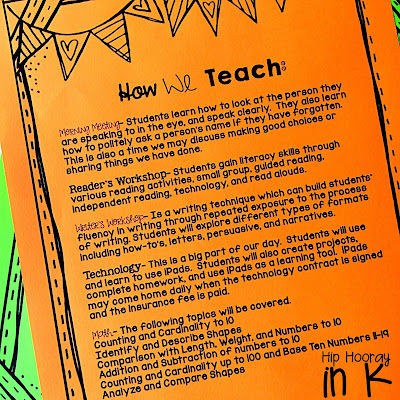
We developed a Welcome to Kindergarten packet to hand out to parents during Bloom into Kindergarten, which we go through with them.

Included on the front page is all of our contact information and the first day of school information.  
The following pages discuss:
-Academic expectations and goals
-They way that we teach
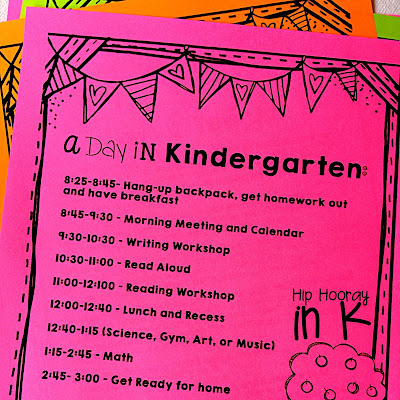
-What a day in kindergarten looks like
-All first day of school information
-The kindergarten supply list 
-Apps that we use in school (we are 1:1 iPads)
-Resource pages including proper letter formation, our sight word list, a writing practice page, 2D and 3D shapes, and number flash cards. 
https://www.teacherspayteachers.com/Product/Welcome-to-Kindergarten-Editable-Parent-Packet-BUNDLE-English-Spanish-and-TK-2012770

This has been tremendously helpful for our parents that are sending their little ones off to school. The packet gives us a lot of talking points. Many parents are surprised to see what kindergartners are expected to know, but probably more surprised when they know it all at the end of the year! Here is a FREE literacy night presentation that you can use to help keep parents updated on student progress.

https://www.teacherspayteachers.com/Product/Literacy-Night-EDITABLE-Presentation-2140398

I really love this packet because all the information is out there for our parents and we have most of their support at home. 

https://www.teacherspayteachers.com/Product/Welcome-to-Kindergarten-Editable-Parent-Packet-BUNDLE-English-Spanish-and-TK-2012770

I made the packet editable (English, Spanish and for TK) for you to use and I hope it is equally as helpful in your classroom! There may be pages that you don't want to use, and you can just delete those out of the PowerPoint. If there is something you would like to see added, I will gladly do so - just shoot me an email! 

What kinds of parent information sheets do you give out? What has been the most successful for you?

Sunday, March 20, 2016

DON'T Give Up on Writing


How do you feel when you get a hand inked card? How do you feel when you get an e-vite?

 
 Hand inked or crafted cards elicit nostalgia, thrill, anticipation.  Those cards are pieces of art, carefully curated by someone who cares either about you and the guest of honor.

On the other hand, e-vites are convenient, sterile, alerting me to an event that I need to put on my calendar. Excitement for the upcoming event, but I'm not going to print it off and display it on my mantle.

So, why are we forgetting to teach our children penmanship and art? And how to the two processes fit together?

I teach kindergarten. Kindergarteners are 5 and 6 years old and have muscles in their fingers that need to be developed - fine motor skills. Typing or pressing letters on a screen does not help develop these muscles.


They need to hold pencils, pens, crayons, tweezers, sort manipulatives, squeeze and push things. They also need to learn letters. So often we combine working on fine motor skills and learning letters and words. This is penmanship too - practicing tracing, writing, connection the dots to build strength and fine motor skills while learning letters. Our kids are writers then, they have begun to open the doors to written communication. In seemingly simple and rote lessons, our students are becoming communicators. 


Some of our students need extra support in either fine motor skills, learning letters, or both.  Others need communication devices or accommodations in order to be successful communicators.  For the general population of our students, writing leads to communication. We are building writers and communicators from day 1.

Writing and penmanship skills will NEVER go away. Think about that inked card. How will our students be effective communicators, eliciting emotion, joy, and passion through their writing? Will it really all be through keyboard and screen interaction?

It can't.

Handwriting and keyboarding are cognitively different processes. We HAVE to teach our students both. According to Edouard Gentaz, professor of developmental psychology at the University of Geneva, in an article from The Guardian, "Children take several years to master the precise motor exercise," that is needed for writing.  Controlling a writing implement on paper, watching the colors appear on pages of a journal, erasing and trying again, this cannot be replaced. 


There are three vital processes integrated through writing: visual, motor, and cognitive. When we teach our students letters in kindergarten, they see what they write (visual), move an object to form the letter (motor), and remember the shape the letter forms (cognitive).  These processes are further outlines in the Huffington Post article Why Does Writing Make Us Smarter? Working with all three processes helps students remember what they are learning because they are forming it.

Students NEED these experiences. Their brains are being molded from each and every experience they encounter. Writing is KEY and not just for little ones.

In the Scientific American article Don't Take Notes With a Laptop, college students were studied taking notes either writing or typing. The results?  The students, "who wrote out their notes by hand had a stronger conceptual understanding and were more successful in applying and integrating the material than those who took notes with their laptops." Why? Because they were using the same three cognitive processes simultaneously, allowing their brains to make deeper connections to the material. 

Students who write are literally, as we say in our class, "growing their brains." 

Watching my students' pride after creating through writing, painting, and drawing is so joyous. We hang their creations on the wall. We show them off to school staff and parents. This will never become obsolete.


However, we are also responsible for teaching our students how to compute - use iPads and computers to communicate and create. We do this through centers and choice time, always balancing the learning targets and keeping our students' unique needs in mind. Our students will need to be able to do both, let's give them every opportunity we can, placing high value on each and every learning opportunity. 


Next time you get that card in the mail, or maybe it is a thank you note, or newspaper clipping from your grandma with her handwriting on it...think.  Think how you still have crafts and papers saved from your childhood that you can sift through with care. Or how my husband turned my Granny's signature into a necklace.  Is writing dead? Of course not. 

Sunday, February 21, 2016

Our 100th Day!

The highly anticipated 100th day of school has come and gone for us, but we had oh so much fun celebrating...as 100 yr olds!!


 Don't worry...that's only 1/2 my class.... I do have more students.

Anyways, to celebrate the 100th day & being able to (mostly) count to 100, we decided to dress up as 100 year olds and write about it! And BOY, did they get creative this year! See that little girl with the walker? Her dad made it our of PVC pipe and spray painted it pink, just for our celebration! She and her cousin also had cotton balls glued to the inside of scarves for fake white hair - adorable!


I don't know what it is, but seeing them dressed up as 100 yr olds just had me and my co-teacher just cracking up all day long!! 

We did have to get serious (kind of) for a minute to write about what we will look like when we are 100 years old. Thank goodness we had the Aging Booth app to help with that!

https://itunes.apple.com/us/app/agingbooth/id357467791?mt=8

I just downloaded the app to my phone and took a picture of each one of the kiddos. You can also use pictures that you already have. 


How cute are they?! After I take each child's picture on the app I drag and drop it into my writing prompt. Voila  - all set! All we needed to do then is brainstorm what 100 year olds do and then we could get to writing!

This one is my fav!! "I am going to knit in my rocking chair with my knitting and my blanket"

 Love ya girl! "I will teach kids."

 My little athlete here has some lofty goals for 100. But the "I will like to have naps, " is right on point! 

And last, "When I am 100 years old, I am in college." Never stop learning kid, never! :o)


You can grab this 100th day writing and more 100th day activities here!
https://www.teacherspayteachers.com/Product/100th-Day-Writing-Pack-11-options-EDITABLE-1707060

In other news we made some pretty sweet 100th day hats that made the organizational freak in me go bananas...but the kids had fun...so it was worth it right! ;o)


How was your 100th day? What did you do that fun and memorable!?


Monday, January 18, 2016

App EXTRAS!


Where in the app world do you find fab apps?! It takes a lot of searching, reviewing, and playing to find some great ones, but don't worry, I've done it for you! 

Previously, I wrote about FREE Math, FREE Literacy, and apps you SHOULD pay for. Right now, let's talk app extras that ROCK!! These are apps that may not fit directly into math or literacy curriculum, but are add-ons that you definitely need for your tech literate classroom.  


This list was super hard to compile - great apps are coming on the market every day.  It is a great place to start though, let's chat a little more about my absolute favs. 


Read a little more about my love affair with Showbie - using our iPads with Showbie makes life A LOT easier. There is just so much you can do with it!


Another MUST in an iPad classroom is a QR scanning app. QR codes are a fun, fast, and logical way to get appropriate content to your students. Here is an example of how we use QRs in our classroom.


This one is both for parents and kids. Remind makes easily communicating with parents in a timely fashion a breeze! Plus you have a record of all your parent contact - hello Danielson teacher evaluation domain 4 - check and check!


Telestory is a fun way to get creative with story making and can get some of your reluctant kiddos rolling!

Last, you are going to think I am crazy. Which I am, but thats besides the point.  Here are three apps that help kids learn to code. I know, my students are 5/6 yrs old. CODING?! No, I can't make you try it, but you should.  


I was VERY skeptical when I introduced Lightbot for Hour of Code this year. HOLY SMOKES! Did my kiddos not only GET it, but the LOVED it!  And...they sat together trying to brainstorm and figure out the code. As in, without my direction, my 5/6 yr olds discussed, problem solved, and collaborated on a topic.  It was INSANE watching and working with them on figuring it out.  Some of the kiddos like Lightbot, which takes more of a lineal path to coding.  Others like Scratch Jr. which is like building a scene that you create code to make the characters function. I could talk about this for hours, but I won't bore you. Ha!


If you want to try some of these bad boys out before getting your kiddos involved, just scan the QRs above. They will take you directly to the app store where you can download the apps for yourself.  


Still looking for more? Download my FREE App Ready Pack, complete with QR cards to help your kiddos access the apps too! If you're just getting started, here are some tips and tricks for ya!


Thanks for stopping by, I would love to hear about the apps that WORK for you and your classroom!


Sunday, January 3, 2016

Easy QRs

Want some instant engagement?! QR codes get kids movin' and groovin'. They give my students an opportunity to make choices during centers and work on their iPads - which is always a welcomed activity to them. 


Engagement is key but it isn't the only component that matters in centers.  I look for my students to develop responsibility and motivation to complete their work, so I always include a way students can record work in addition to enjoying their work!


Making QR codes is EASY to do, and you can add them to anything you use in your classroom! They can link to videos, websites, plain text, audio - anything!!

Here is how to make a QR and add it to a document! Follow these easy steps and you will be set in NO time! 


1. Find the video or link you want the QR to go to:

My link is this ABC Mouse "Z" video. So I just click in web address bar and copy the link. 

2. Once your link is copied, open up a new tab, and go to safeyoutube.net (or another safe sharing website). I do this so that my QRs don't link to You Tube, and so I have a little more control of the content my kiddos can access. You can skip this step if you don't need to create a safe link. 

3. Paste your link into the safe sharing generator, and click "generate link." Then copy this link. 


Now you are ready to go to QRstuff.com

If you are not using a link, you can post plain text like I have done below. When my kiddo scans this QR, the word "can" will pop up. If you are using a link move on...


4. Paste your link in the box by the #2. Your QR will be created automatically. Done! Not so fast...let's get the QR into a document. 


5. I DO NOT download the QR. I just drag it with my mouse from the website browser into a Powerpoint file. See how I have my Powerpoint document under my web browser? Just click the QR, drag it until you are hovering over the white page of your Powerpoint and let go, or drop it into the Powerpoint. Voila! 


6. Now that it is in your document, you can make it larger, smaller, crop the sides... Just click on the Qr and you will be able to change it to how you like.

As you can see I have cropped mine to fit next to the animals on my QR Scan and Record task cards. 


Here, I am working on cropping the QR to fit. 


Now you have your QR codes and you are set to print!


As I mentioned, my kiddos record their work after using these QR codes.  I put their recording sheet into the Showbie app on their iPads and they go to town!! You can print the recording sheets easily too and there are a few options that your kids can choose from. 


My kiddos are totally into scanning these QRs that link to ABC Mouse videos. Then they write or color the letter/sound that they watched.  Its great for morning work or earlier finishers! Post each kiddo's response sheet on the wall, or in their folder and they can work on it say after day until complete! Or maybe send it home over the weekend? Just some thoughts.... :o)

Enjoy QRing! Check out my FREE Getting Started with iPads pack if you are just getting started with QRs and/or iPads or you are looking to streamline your classroom management with your tech!

Here are a few other QR resources you may like too!

Thanks for stopping by!