Image Map
Showing posts with label Math. Show all posts

Monday, August 1, 2016

Helping parents get ready for Kindergarten

https://www.teacherspayteachers.com/Product/Welcome-to-Kindergarten-Editable-Parent-Packet-BUNDLE-English-Spanish-and-TK-2012770

Sending your little one off to kindergarten can be emotional. Parents want to make sure their child's teacher will protect, love, and care for their child the way that they do. Our new students are someone's little one all grown up and off starting to have personal rather than familial experiences. 

Parents will eagerly await for their child to stories about school, their new friends, and the new things that they learned. And...our students will often answer, "Nothing" or "I don't know" leaving parents asking, "What DO they do all day."

Preparing parents and new kindergartners for school is equally important.  Teachers know how special each member of their new class will be and it's our job to help all children learn in a safe, exciting, educational environment.
https://www.teacherspayteachers.com/Product/Welcome-to-Kindergarten-Editable-Parent-Packet-BUNDLE-English-Spanish-and-TK-2012770

Each year, our district hosts a Bloom Into Kindergarten event for incoming kindergarten parents in May. We meet our new class members and discuss with the parents the expectations for incoming kindergartners keeping in mind developmentally appropriate goals and tasks. Parents and students make letter activities and we discuss the expectations and discuss all the wonders that kindergarten holds. 


We developed a Welcome to Kindergarten packet to hand out to parents during Bloom into Kindergarten, which we go through with them.

Included on the front page is all of our contact information and the first day of school information.  
The following pages discuss:
-Academic expectations and goals
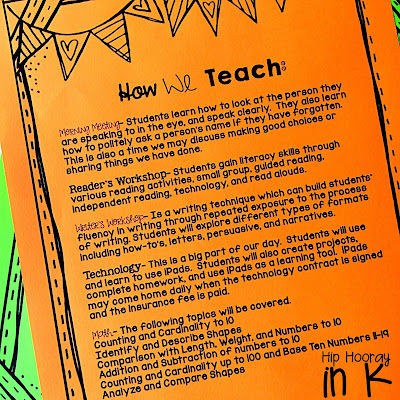
-They way that we teach
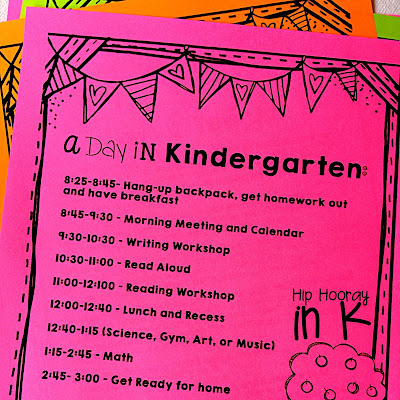
-What a day in kindergarten looks like
-All first day of school information
-The kindergarten supply list 
-Apps that we use in school (we are 1:1 iPads)
-Resource pages including proper letter formation, our sight word list, a writing practice page, 2D and 3D shapes, and number flash cards. 
https://www.teacherspayteachers.com/Product/Welcome-to-Kindergarten-Editable-Parent-Packet-BUNDLE-English-Spanish-and-TK-2012770

This has been tremendously helpful for our parents that are sending their little ones off to school. The packet gives us a lot of talking points. Many parents are surprised to see what kindergartners are expected to know, but probably more surprised when they know it all at the end of the year! Here is a FREE literacy night presentation that you can use to help keep parents updated on student progress.

https://www.teacherspayteachers.com/Product/Literacy-Night-EDITABLE-Presentation-2140398

I really love this packet because all the information is out there for our parents and we have most of their support at home. 

https://www.teacherspayteachers.com/Product/Welcome-to-Kindergarten-Editable-Parent-Packet-BUNDLE-English-Spanish-and-TK-2012770

I made the packet editable (English, Spanish and for TK) for you to use and I hope it is equally as helpful in your classroom! There may be pages that you don't want to use, and you can just delete those out of the PowerPoint. If there is something you would like to see added, I will gladly do so - just shoot me an email! 

What kinds of parent information sheets do you give out? What has been the most successful for you?

Tuesday, February 23, 2016

What's a Chirbit?

I have been dreaming of an EASY way to link voice recording to QR codes for a LONG time. And finally, I have found it! Seriously Chirbit, where have you been hiding?

Chirbit allows you to create audio files right on your computer and seamlessly convert them into QR code or another output. 

Follow these few quick steps and your kids will be using the QRs in no time!


Inno time, you can have QRs that link to voice. Now my kiddos just scan the QR and can hear me read the number to them. We use these cards in centers, as flash cards, and for take home!

Chirbit is SUPER easy to use and kid friendly too! I just used it to create this fun center for tricky teen numbers. And why not for numbers 1-10 too?


If you want to learn more about how I use these centers, just scan the QR code in the lower left! 
How excited are you to use Chirbit in your own classroom?! Don't have iPads or tablets? Just save the link to a word document! I know my kids LOVE hearing my voice...even though I would object! I am sure the would love to hear yours too! 

Have fun learning!

Monday, January 18, 2016

App EXTRAS!


Where in the app world do you find fab apps?! It takes a lot of searching, reviewing, and playing to find some great ones, but don't worry, I've done it for you! 

Previously, I wrote about FREE Math, FREE Literacy, and apps you SHOULD pay for. Right now, let's talk app extras that ROCK!! These are apps that may not fit directly into math or literacy curriculum, but are add-ons that you definitely need for your tech literate classroom.  


This list was super hard to compile - great apps are coming on the market every day.  It is a great place to start though, let's chat a little more about my absolute favs. 


Read a little more about my love affair with Showbie - using our iPads with Showbie makes life A LOT easier. There is just so much you can do with it!


Another MUST in an iPad classroom is a QR scanning app. QR codes are a fun, fast, and logical way to get appropriate content to your students. Here is an example of how we use QRs in our classroom.


This one is both for parents and kids. Remind makes easily communicating with parents in a timely fashion a breeze! Plus you have a record of all your parent contact - hello Danielson teacher evaluation domain 4 - check and check!


Telestory is a fun way to get creative with story making and can get some of your reluctant kiddos rolling!

Last, you are going to think I am crazy. Which I am, but thats besides the point.  Here are three apps that help kids learn to code. I know, my students are 5/6 yrs old. CODING?! No, I can't make you try it, but you should.  


I was VERY skeptical when I introduced Lightbot for Hour of Code this year. HOLY SMOKES! Did my kiddos not only GET it, but the LOVED it!  And...they sat together trying to brainstorm and figure out the code. As in, without my direction, my 5/6 yr olds discussed, problem solved, and collaborated on a topic.  It was INSANE watching and working with them on figuring it out.  Some of the kiddos like Lightbot, which takes more of a lineal path to coding.  Others like Scratch Jr. which is like building a scene that you create code to make the characters function. I could talk about this for hours, but I won't bore you. Ha!


If you want to try some of these bad boys out before getting your kiddos involved, just scan the QRs above. They will take you directly to the app store where you can download the apps for yourself.  


Still looking for more? Download my FREE App Ready Pack, complete with QR cards to help your kiddos access the apps too! If you're just getting started, here are some tips and tricks for ya!


Thanks for stopping by, I would love to hear about the apps that WORK for you and your classroom!


Sunday, July 26, 2015

APPmazing Free Math Apps (for iPad)

What's better than free stuff for your classroom? Nothing. and when it comes to apps for your kiddos iPads, new apps can get pricey. Up to $30 bucks a pop for one set of classroom apps. And lets be honest, one app doesn't get you too far into the school year.


Over the past few years, I have played around with a number of free apps and compiles a HUMONGOUS list of the best ones. These are apps which don't have a ton of in-app purchases, that are easy to use, and have been tested out by the kiddos in my classroom.

I am going to chat a bit about each one of these math apps in case there is something specific you are looking for, but I would suggest just trying them out for yourself - for FREE! Also, in the coming weeks, I will write about my suggested free literacy apps, apps you SHOULD pay for, and some app extras that I am absolutely in love with.


The above apps are my kiddos absolute favorite math apps. They lasted throughout the year and the kids always went back to them.  There are paid versions of these too, but the free versions work just fine.


Front Row is a CCSS aligned app that allows for skills practice for students based on their academic needs. Students take a pre-test and the app adjusts to the level at which they are working.  I especially love Front Row because it allows you to differentiate skills effortlessly.


Skoolbo is actually a literacy and math app that spirals skills through the playing time. It is more a game platform so it ropes kids into practicing skills as they continue though the game. You can challenge kinds in your class or kids throughout the world. It makes me a little motion sick, but the kids absolutely LOVE it!


The above QR links take you right to the app store to download the apps. You can get the complete listing and cut out cards for students to scan FREE in my TPT store


Disclaimer: I did not create any of these apps, nor do I claim any rights to them. They are all free apps on the app store. Please support the creators of these fabulous education apps!

Saturday, March 28, 2015

Spring Bunnies


Hellllooo spring break! Well, not yet. We've got four more days...but we WILL make it! :o) How? By having way to much fun this week and doing all things bunny related...

Here's a little preview of my center set-up for this week   ------------->


We've got plastic eggs for digraphs, blends, sight words, subtraction, word problems - you name it.  I actually think I bought all of the mini erasers in the dollar spot at Targea for this week, but I digress....

First up we have Sight Word Scramble - you can use this with or without the eggs. I just wrote the sight words on the egg, put a cut up version of the word inside and the copies to match.  Read the word, fix it, write it -  easy cheesy. 


Next a little blend egg spinning game. Each egg has a blend, spin it to make a word and record the word. We are working on "L" blends and "R" blends for now, so those are the ones I addressed.  Again, you don't need the eggs for this, its just a lil bonus for the kiddos. 


Digraphs are the same concept as the blends...there are also two options for these centers.  One is just writing the word, the other is writing the word and the sentence!


Here we have a little surprise! Sight words are written on the outside of the eggs and the mini erasers are inside.  So the littles write the word, open the egg, record the number of bunnies and carrots and write a number sentence.


I have no idea why, but my littles love mix and fix sentences. If I cut it up, they HAVE to put it back together. It's like the weirdest thing ever...so anyways here's a sentence builder for that. Use the sentence fluency strips in this pack. Cut them up, NUMBER the back - because, well you know why, and put the pieces in the egg. The kids organize the pieces and write the sentence. 


So those are all my ideas for a successful week...now implementation may be a different thing - but that's the joy of teaching, now isn't it? ;o)

I have got some number sentences, subtraction and addition, and number bonds in there as well, but you may just want to go here for a preview.

Thursday, March 26, 2015

Numbering bonding the K way

Today we continued exploring number bonds (FREEBIE here), which I like to introduce during our addition and subtraction units. Number bonds are a fun way to show your students how numbers are linked together in families, but it can be difficult to understand the connection when our little minds are transitioning from rote mathematic skill to application.


I struggled to find a way to make number bonds make sense for some of my kiddos - the mini-lesson and reteaching wasn't quite getting us to where we needed to be, so today we tried a new game.

BTW, anything labeled a "game" seems to make tasks more fun, right? :o)

Earlier this week, was drawing a number bond on the SmartBoard when one of my littles said it looked like a person, and bam. It hit me. Duh, they should be the "bonds" the kids kids should be acting it out. Gotta love teachable moments right?


So I put together a little guessing game to reteach (and activate) some of my little's minds who weren't quite there earlier this week.

The tallest little one in each group of 3 got to start being the "big circle." He or she held a few foam cubes in his/her hand and secretly divided it up into two groups.  She/he passed out the two group at the same time - just like the number bond "shoots" out two groups. Since the kids knew what the "big" number had to be the two "little circle" kids figured out what each other had.  Then they gave it back to the "big" and tried again. Everyone got a chance to be the big, so I knew we were hitting all areas of understanding.


I was amazed, surprised and SO proud how well my littles played this game! We TOTALLY got it!


Days like this remind me why I am in teaching - to enjoy the little moments and experiences that early learners give you. They see things that we as adults just do not. And I love the level at which they can explain and understand each in their individual way. It is seriously such a cool experience each day.

Ok. done. :o)